
Tokenome documentation
Team server setup
Standing up the server, enrolling a laptop, opting a project in, the share gate, retract and purge, and searching as a team.
Documentation
Team
Team adds a shared index your organization runs, so one search covers everyone's opted-in projects with attribution. Each laptop keeps its private local index exactly as before.
Team is in beta, and free while the beta runs. Nothing is enforced, there is no seat limit, and there is no key to install. No end date is set; you will get notice well before anything changes.
You run the server, on your own infrastructure. Tokenome does not host one for you.
Download this guide as a PDF · rendered from this page, so the two cannot drift.
The shape of it
Each person opts specific projects in. From then on, new and changed segments from those projects are mirrored to the server as the local indexer sees them, redacted on the laptop before they leave it. Searches then cover the team first, with each hit attributed to the person who shared it, and fall back to local results if the server cannot answer. Nothing is shared by default, and anyone can retract everything they have shared at any time.
Standing up the server
The server is one container image, ghcr.io/tokenome/tokenome-server,
built and smoke-tested on x86_64 and aarch64 with every release. It needs a search
engine of its own and a volume that survives redeploys. Do not point it at the search
engine your laptop uses; it writes into the same collection.
With Docker
The compose bundle on the releases page pins the version and brings up the index, the server and automatic TLS, with only ports 80 and 443 exposed. Set your domain and a strong index key in its environment file, then bring it up.
On Railway
One project, two services, if you would rather not run a VM.
- Create the Typesense service from the public image, with a volume mounted at
/data, a data directory and API key set, the API address bound dual-stack, and a thread pool cap. Give it no public domain. - Create the server service from the container image, with its own volume at
/data, the index host, port and key pointing at the first service, a JWT secret, and the bootstrap admin variable for the first boot only. - Generate a public domain for the server service on port 8080, and set the health
check to
/v1/health.
The volume on the server service is the step people miss. Without it the identity database holding users, devices, holds and the audit log lives on the container disk and is wiped by every deploy. The symptom is a laptop that enrolled minutes ago being told its device is unknown.
The first admin
Bootstrapping creates the identity database, the signing secret and the first admin, and prints a one-time enrollment token and eight recovery codes. Keep the codes offline and away from that laptop: one of them re-admits the admin if the laptop is lost. On a hosted deployment the bootstrap prints no recovery codes, because a deploy log is not the place for them; generate them in the console once you are in, and remove the bootstrap variable afterwards.
Check it from outside before you hand out any tokens:
curl -s https://<server>/v1/healthEnrolling a laptop
With the enrollment token and the server address in hand:
tokenome remote enroll --server https://<server> --token <token> --label "my-laptop"Enrollment generates a keypair on the laptop and sends only the public half. There is no password. Tokens are single use and expire after 72 hours, so deliver them in person or over a channel you trust, one per device.
A second laptop never uses a second seat. While the old one still works, press
Add a device on My footprint and enroll the new one with
--restore-shares, which shares the same projects you shared before. Local
history does not move between machines.
Opting a project in
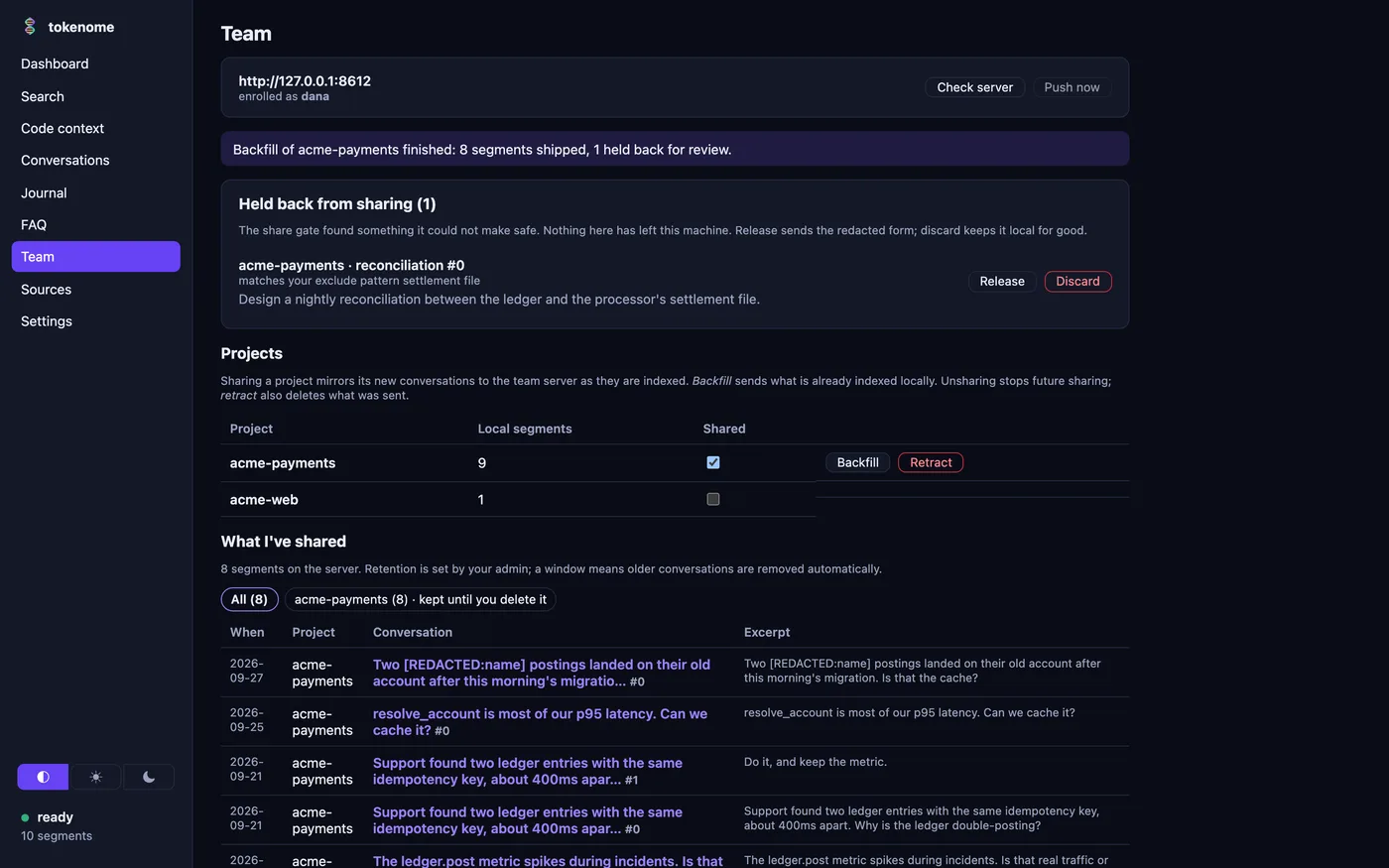
tokenome remote share <project> --backfill
tokenome remote projects
tokenome remote status
tokenome remote shared
Nothing is shared until you run that first line. --backfill also
sends the history you have already indexed for that project; without it, only turns
indexed after you opted in are mirrored, which leaves a new server looking empty. The
server reconciles by content, so running a backfill twice does not duplicate anything.
Three things are never shared: projects not on your list, segments with no project at all, and anything on a laptop that has not enrolled. Your local index stays complete either way.
The share gate and redaction
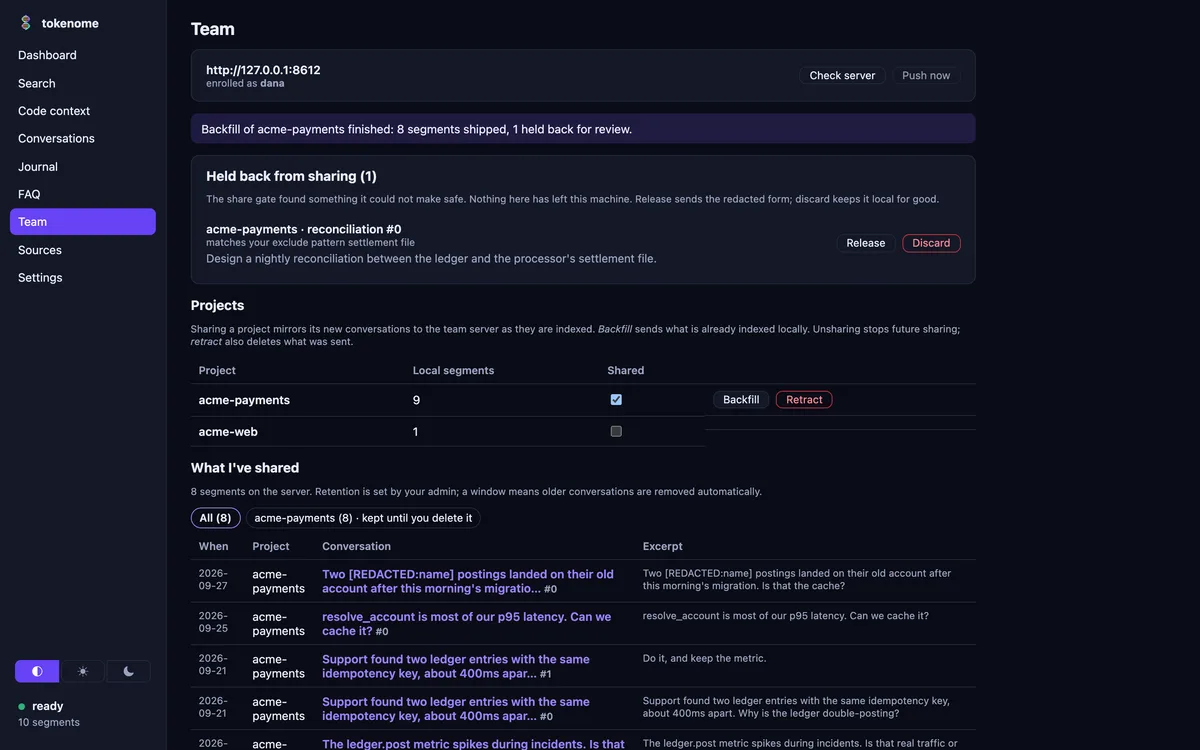
Before a segment leaves the machine it passes the gate. Secrets, meaning keys, tokens, private keys, connection strings and assignments that look like credentials, are replaced with a marker. Personal data, meaning email addresses, phone numbers and card or identifier shapes, is replaced with typed markers unless you turn that off.
Names cannot be recognised by shape, so the gate works from a dictionary you keep: people, customers, codenames. A listed name is replaced wherever it appears, in any case, and never holds a segment back.
A segment the gate cannot make safe, a private key block, a credential dump, or a match on one of your exclude patterns, is held back. It stays on your machine, the app tells you, and the Team panel lists it with Release, which sends the redacted form, and Discard, which keeps it local for good.
tokenome remote gate                                 # the rules in force
tokenome remote gate --exclude '^customers/'         # hold back anything touching that path
tokenome remote gate --redact-name 'Acme Corp'       # everywhere
tokenome remote gate --project acme --exclude '^invoices/'
tokenome remote gate --pii off                       # keep email addresses in shared text
tokenome remote quarantine                           # what is held back, and why
tokenome remote quarantine --release <id>
tokenome remote quarantine --discard <id>
Exclude patterns and names can be global or apply to a single project, on top of the global lists. The same controls are in the Team panel's share gate section, with a block per shared project.
When the gate rewrites any text, the segment ships without its vector and the server computes a new one from the redacted text, so the vector cannot carry what the redaction removed.
Retract and purge
tokenome remote unshare <project>            # stop sharing future turns
tokenome remote unshare <project> --purge    # and retract what is already there
tokenome remote push                          # flush the queue now
Deleting a conversation in the app removes it here and queues its removal on the server, whether or not the project is still shared. Removals ride the same queue as pushes and in the same order, so being offline only delays them. Documents under a legal hold stay on the server, and the app tells you how many were kept.
Searching as a team
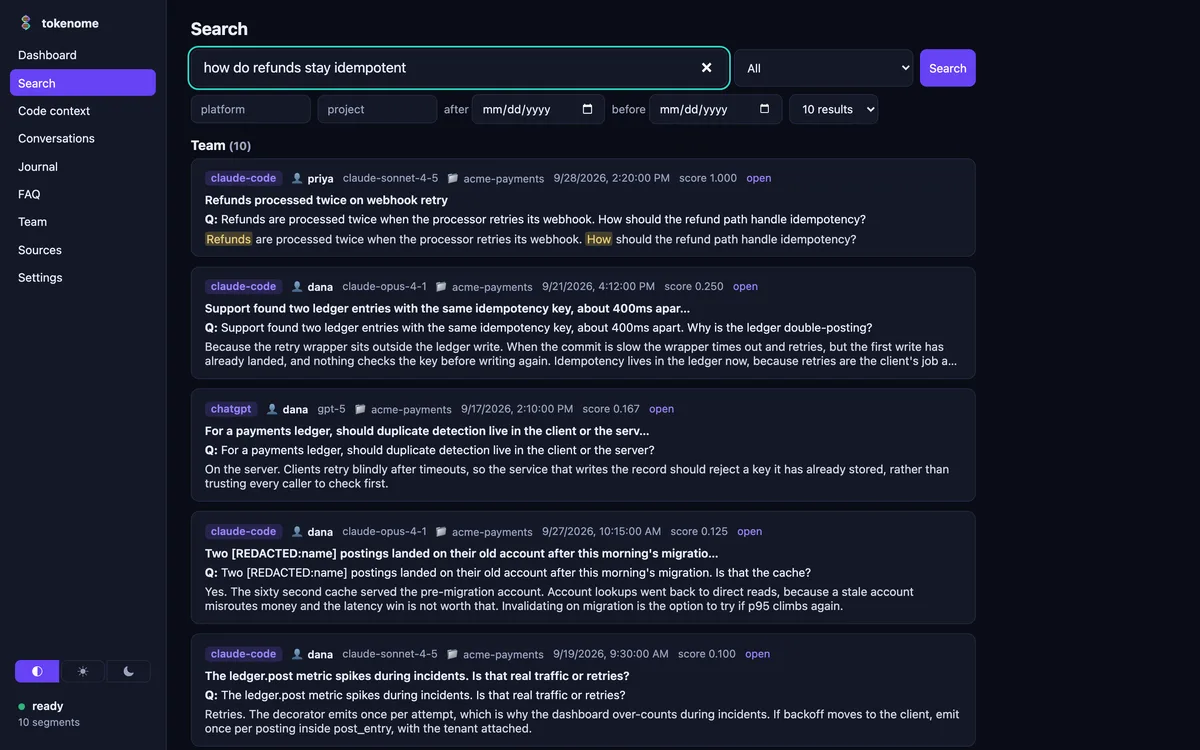
Once enrolled, search covers the team by default and every team hit names the person it
came from. The Search page gains a scope selector and the CLI takes
--scope team, mine or all; see
Finding things. A teammate's conversation opens
in a read-only reader that names who shared it.
If the server does not answer quickly you get your local results with a visible warning, rather than a search that hangs. Two filters, label and conversation, are always answered locally.
What the server holds
The server holds shared text and its vectors in the clear. That is what makes keyword and semantic search possible, and we would rather say so than imply otherwise. The protection is organizational: you run the server, on your infrastructure, behind TLS and encrypted at rest, and redaction is a safety net rather than a licence to share what the organization should not hold.
Next: the admin console, which is where people, devices, retention and the audit log are managed.