
Documentation
First run
Launching the app brings the whole stack up and starts reading what is already on your disk. There is nothing to configure before it works.
What happens when you launch it
- The app starts the search engine and the background service that does the indexing, and keeps both up. A menu-bar icon shows whether the stack is running.
- It looks for the conversation sources it knows about and reports which ones it found on this machine.
- It indexes what it finds, oldest first, and keeps going in the background. Closing the window only hides it; indexing continues. Quitting the app shuts the stack down.
Nothing is downloaded at this point. The embedding model and the search engine came with the app.
What gets indexed
Tokenome splits each conversation into segments: a question, the answer, and the tool actions around them. Every segment carries its timestamp, the project it belongs to, the platform it came from and the model that wrote it. Only new or changed turns are re-embedded, so a second pass over the same transcript is cheap.
| Source | Where it comes from | What you do |
|---|---|---|
| Claude Code | ~/.claude/projects | Nothing. It is picked up automatically, and the plugin also indexes a session as it ends. |
| Claude Desktop and Cowork | The claude.ai API | Set TOKENOME_CLAUDE_SESSION_KEY to your own claude.ai session cookie. |
| ChatGPT | An export you drop in | Settings, Data Controls, Export; unzip it; drop conversations.json into ~/.tokenome/import/chatgpt. |
| Gemini | An export you drop in | Drop a flat JSON export into ~/.tokenome/import/gemini. |
The Sources page in the app lists each one with its location, turns auto-ingest on or off per source, runs an ingest on demand, purges a source, and takes a one-off file or folder through a native file picker.
Where your data lives
Everything Tokenome creates sits under ~/.tokenome. Your original
transcripts stay where their own tool put them; Tokenome reads them and does not move
them.
| Path | What is in it |
|---|---|
~/.tokenome/data | The search index. |
~/.tokenome/journal | One markdown file and one JSON file per day. |
~/.tokenome/import | The drop folders for ChatGPT and Gemini exports. |
~/.tokenome/api.token | The token local clients use to talk to the service on this machine. |
~/.tokenome/sources.json | Which sources are switched on. |
How to check it is working
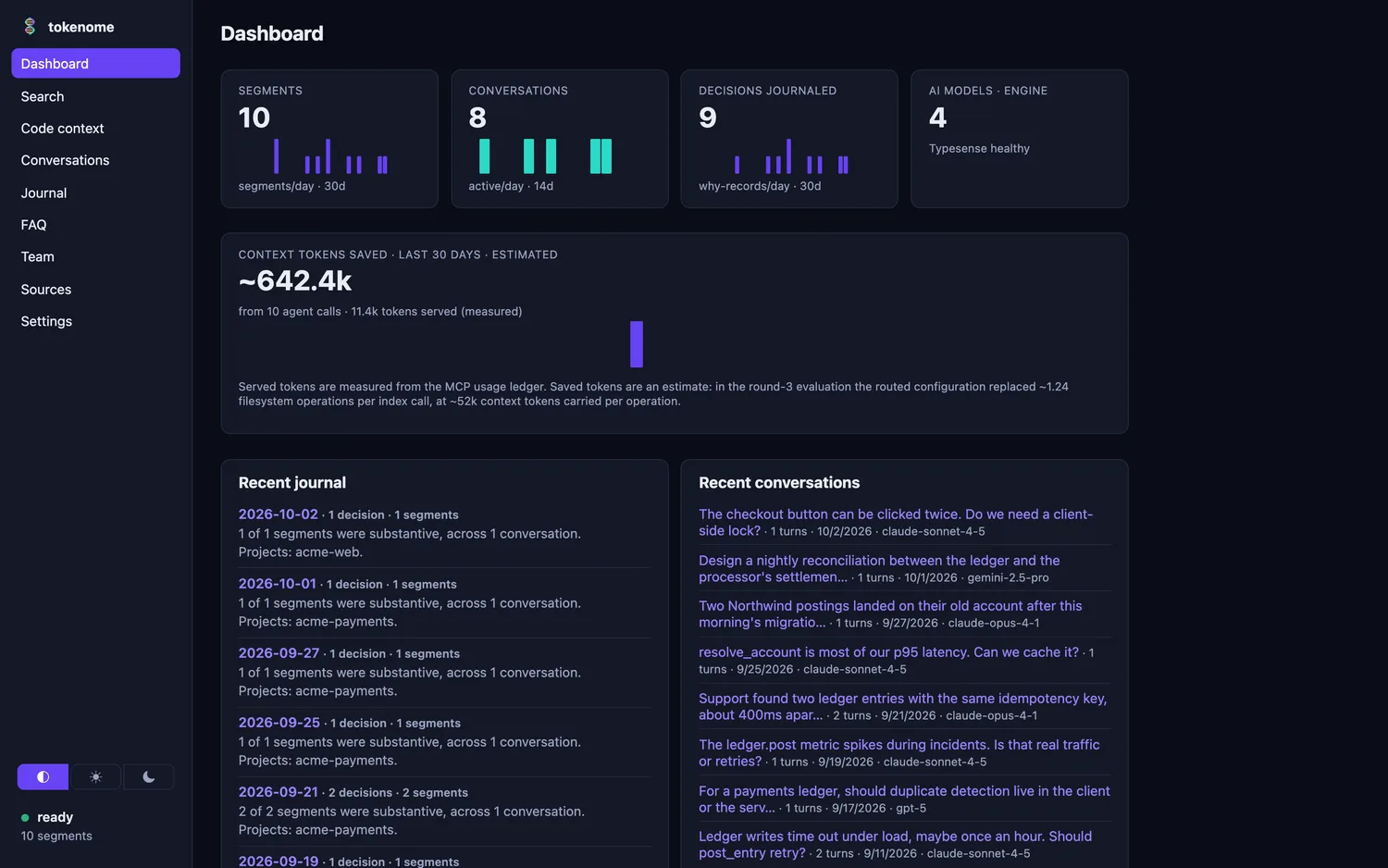
The Dashboard shows how many segments and conversations are indexed, how many decisions the journal has written, whether the search engine is healthy, and the context tokens saved across agent calls.
From the command line:
tokenome statuswhich prints the collection, the document count, the newest entry, and a breakdown by platform, model and project.
Opening the web UI. Use tokenome app, or
tokenome open if the service is already running. Typing
localhost:8741 into a fresh browser tab by hand will not sign you in:
the service does not put its token into a page, so the tab needs the one-time launch
link those commands produce.