Team  ·  in beta

One search across everyone, with who said it

The Team server is the paid half of Tokenome. A member searches their own history and everyone's opted-in projects in the same query, and every team hit carries the name of the person it came from. You pick which projects to share. Secrets are redacted on the laptop before anything leaves it. The server is yours: one container image, on your own infrastructure.

Team is in beta, and free while the beta runs. No end date is set. When billing starts we will tell every beta team at least 30 days beforehand.

We built this server so that people who now work through their own agents can see each other's reasons again. Read why we built it.

In the beta now

What it does today

Everything in this list is running on the server a real team uses. The step-by-step commands are in the Team documentation; this is what you get.

The Team server in 0:31: one search across everyone, the share gate, the admin console, and who runs it. Every screen is the real app and the real console. The project and its conversations are sample data; the software is not.
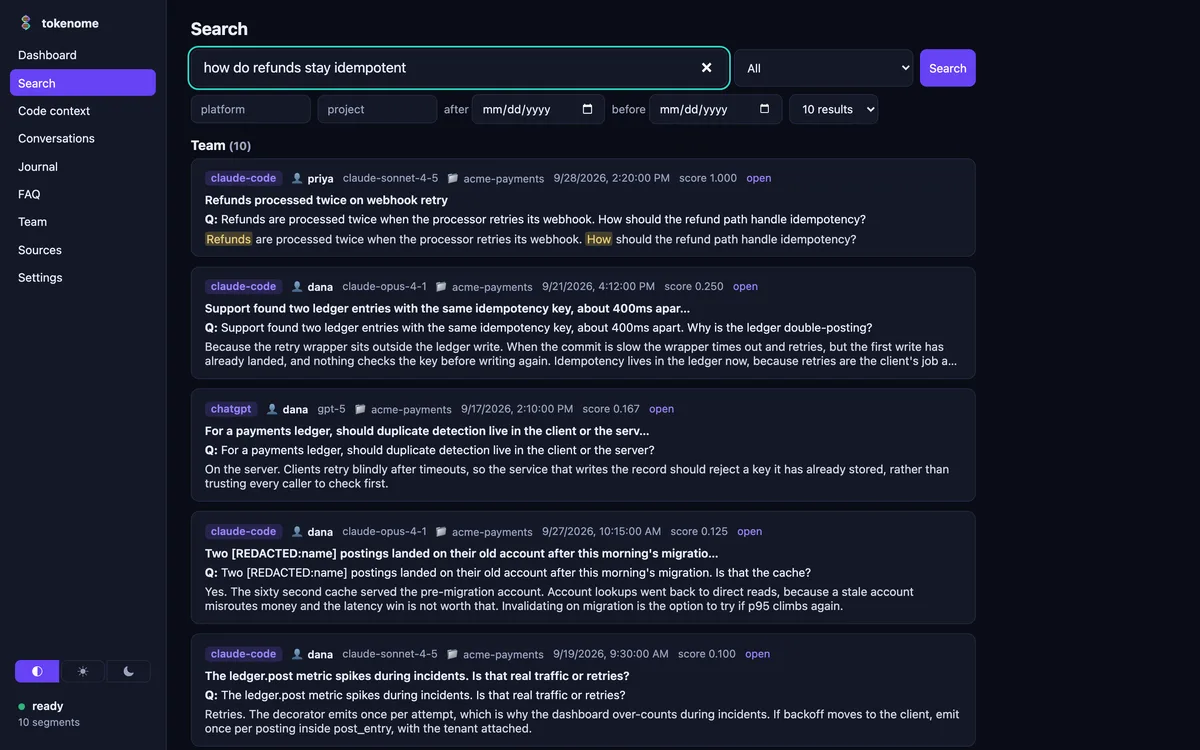
One search for how refunds stay idempotent, returning the member's own hits and team hits attributed to priya and dana.
One query, Mine and Team, with attribution on every team hit. The project and its conversations are sample data; the software is not.
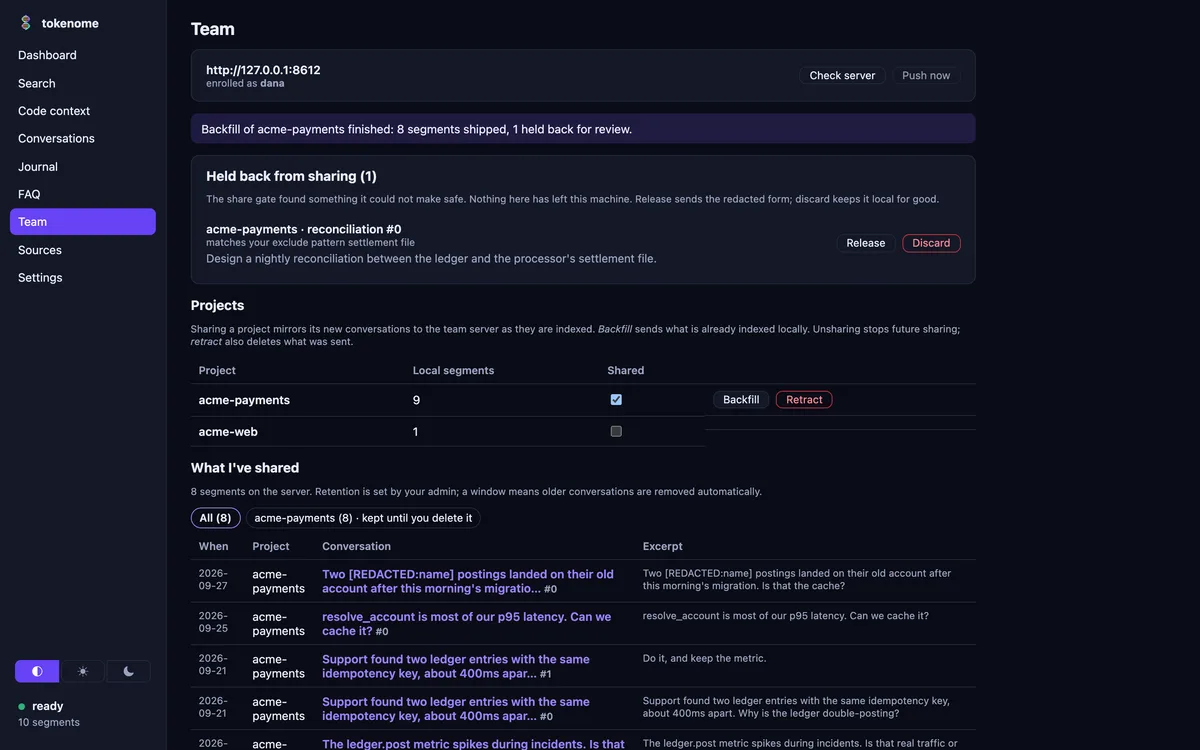
A backfill reporting eight segments shipped and one held back for review, the held card naming the exclude pattern that caught it, and a shared table showing a redacted customer name.
The share gate holds back what it cannot make safe, and redacts the rest before it leaves the laptop. Sample data.
  • One search across everyone's opted-in projects, with attribution on every team hit
  • Per-project opt-in sharing: nothing is shared until a member shares it by name
  • Secrets redacted on the laptop, before anything leaves it
  • Backfill of the history you already have, in the same command
  • Retract and purge: stop sharing a project, and remove what was already sent
  • Device-key enrollment, with admin enroll and revoke
  • The admin console: people and devices, lost-laptop recovery, an append-only audit log, retention windows and legal holds, sharing coverage, seats, and My footprint
  • Local search, provenance and the journal keep working exactly as they do free

How it is run

You run the server. We do not.

Tokenome does not host a team server for customers. There is no account to create and no address of ours for your data to pass through. You bring up the server your organisation owns, and your laptops talk to it.

Tokenome's architecture in one drawing. A boundary marked Your machine encloses the AI coding tools, capture and segmentation, on-device embedding, the local Typesense index, code provenance, and every way you and your agent search it. One gate crosses the boundary, marked opted in and secrets redacted, and it leads to a team server you run.
Everything inside the line runs on your own machine and is free. The gate is the only way out, and only a project you opt in goes through it.
The same diagram in words

Your AI coding tools, Claude Code, Claude Desktop, ChatGPT and Gemini, write their transcripts to disk as you work. Tokenome reads them where they land.

On the same machine it splits the threads into turns, computes the embeddings on your own hardware, and indexes everything locally in Typesense. Code provenance links a line of code back to the conversation that produced it.

You reach the index through the app, the command line and a local web UI, and an agent reaches it over MCP. All of that is free, and none of it leaves the machine.

One gate crosses the boundary. When you opt a project in, its segments are redacted on the laptop and then mirrored to a team server your organization runs, where a teammate's search finds them with your name on them. Tokenome does not host that server.

With Docker

The server is one container image, ghcr.io/tokenome/tokenome-server, built and smoke-tested on x86_64 and aarch64 with every release. The compose bundle on the releases page pins the version and brings up the index, the server and automatic TLS.

On Railway

The same image as one service with a volume, next to the index, with a health check on /v1/health. The settings are listed field by field in the Team documentation.

The image is published with the launch release, so if a pull is refused, write to hello@tokenome.ai and we will get you access. Enrolling the first laptop is one command, and the first admin is minted on the server itself; both are in the Team documentation.

Admin console  ·  in the beta now

The answers an admin has to give, on one screen

Who has access, on which devices, what is being shared, what is kept and for how long, and who looked at what. It runs on your server, next to the index, and every member can see their own footprint without asking anyone. Page by page, it is documented in the admin console documentation.

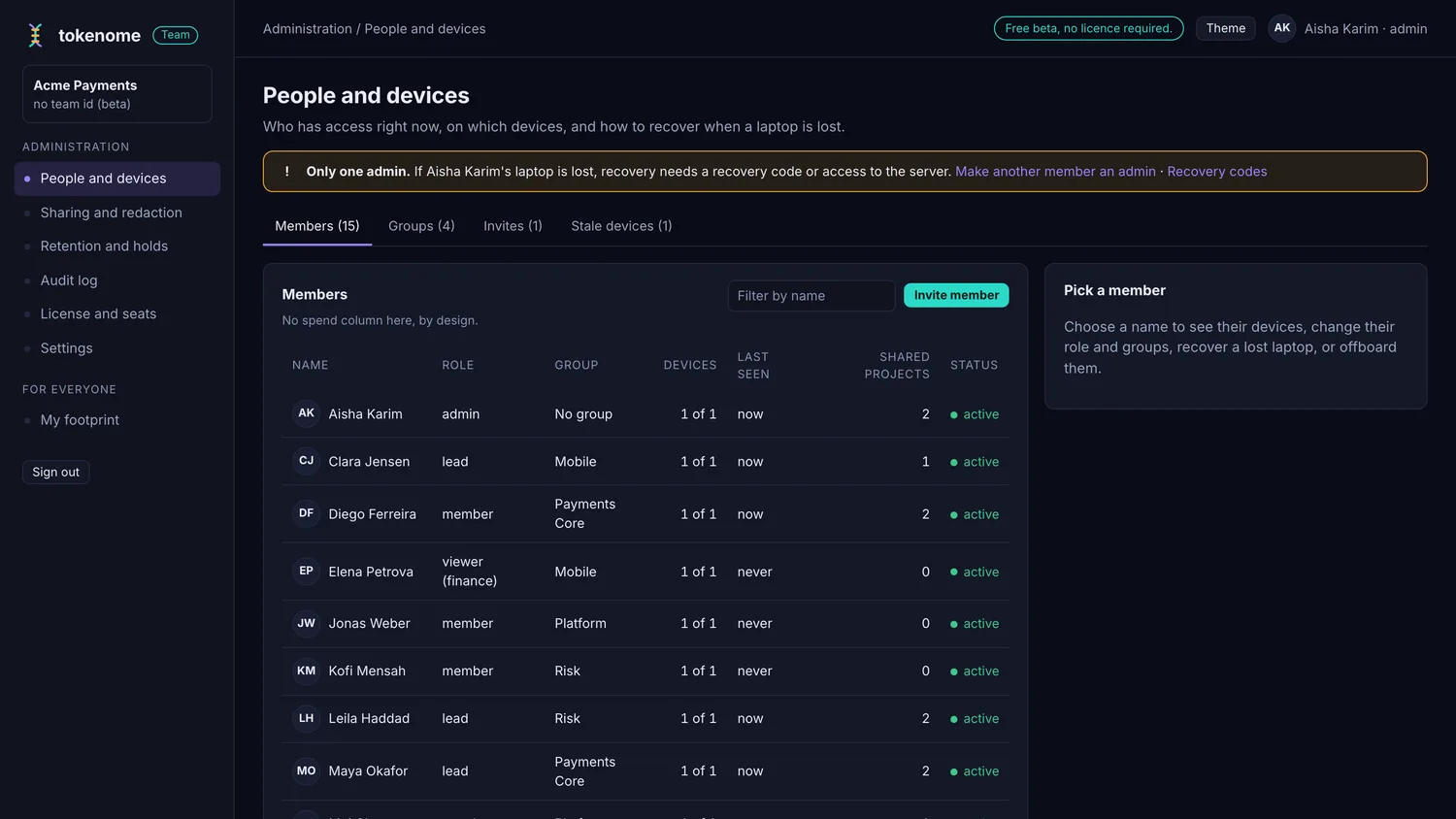
The admin console People and devices page: a member roster with roles, groups, device counts, last seen and shared project counts, plus tabs for groups, invites and stale devices.
People and devices: the roster, the groups, the roles, and how to recover when a laptop is lost. The project and its conversations are sample data; the software is not.
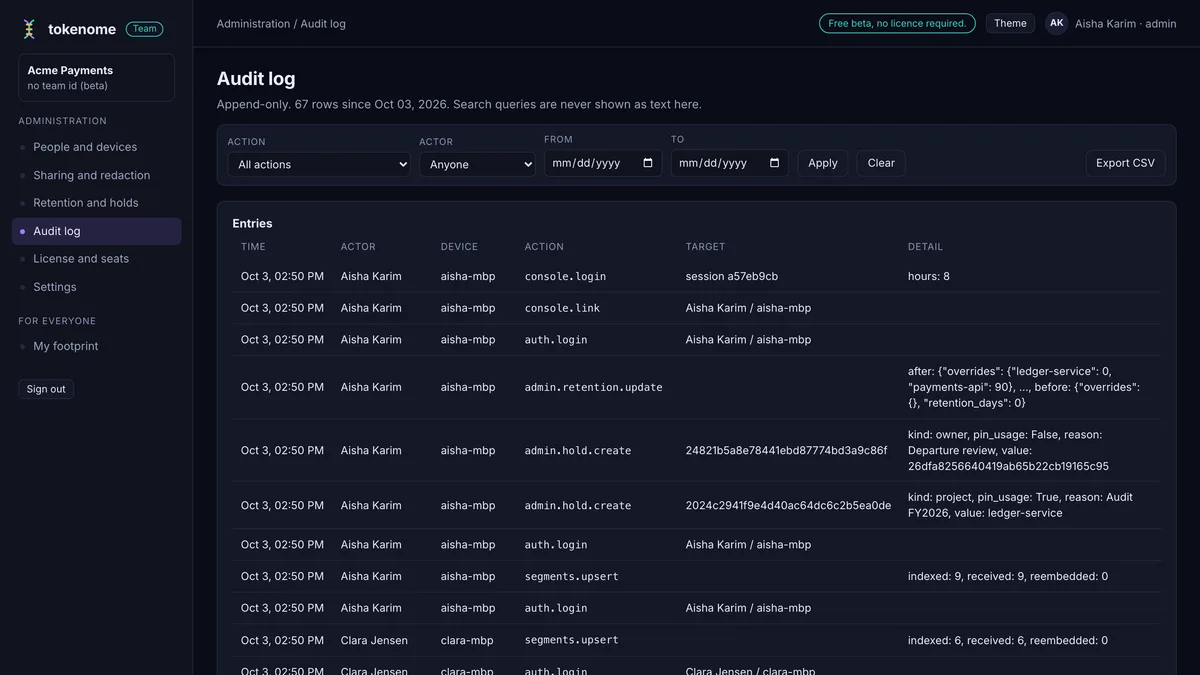
The append-only audit log with action and actor filters and an export to CSV.
An append-only audit log, filterable by action and actor, exportable as CSV. Search queries are never stored as text.
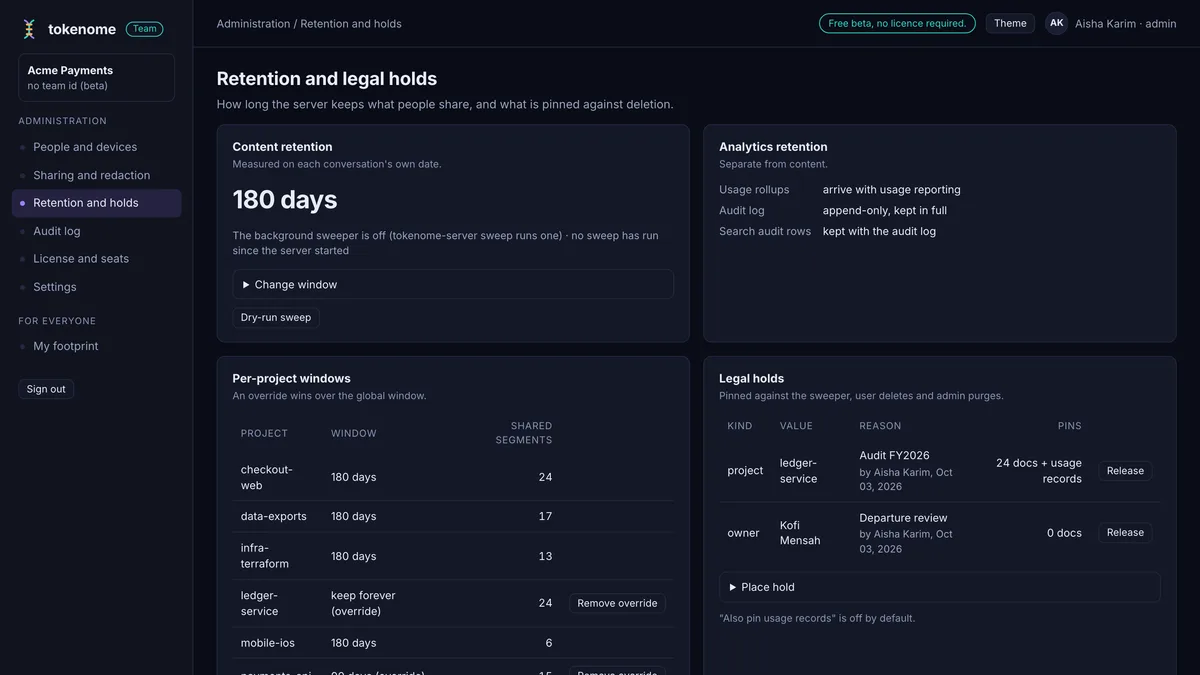
Retention set to 180 days with per-project windows and overrides, and two legal holds listed below.
Retention windows per project, and legal holds that pin content against the sweeper until they are lifted.
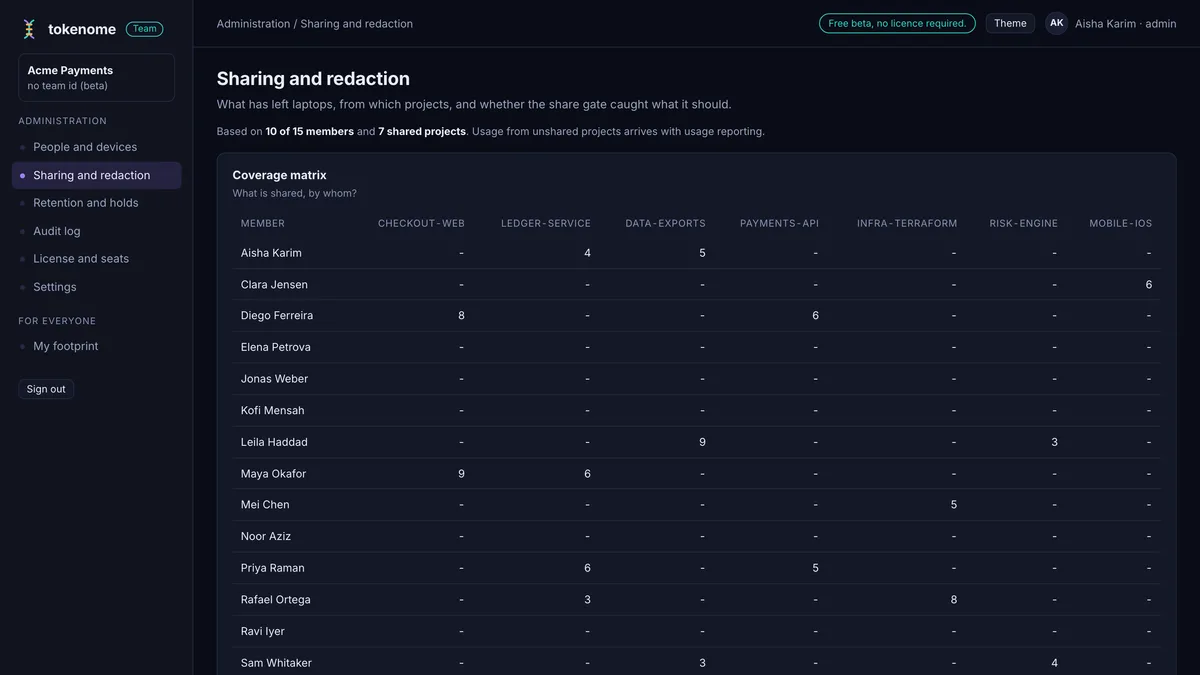
A sharing coverage matrix showing which members share which projects, with per-member counts.
Sharing coverage: who shares which project, and who is sharing nothing at all.
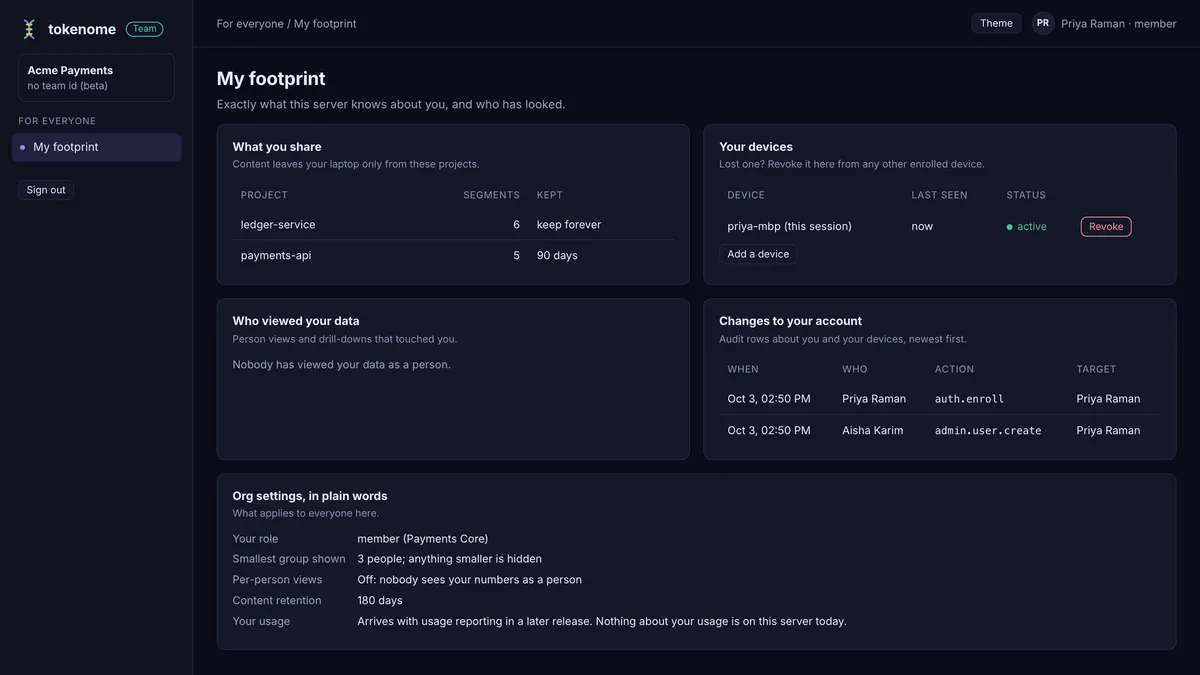
The My footprint page a member sees: what they share, their devices, who viewed their data, and the organization settings in plain words.
My footprint, for every member: what you share, your devices, who looked, and the org settings in plain words.
  • Lost-laptop recovery: revoke the device, mint a recovery code, keep the data
  • Seats: who counts as a seat, who has gone idle, who has an invite outstanding
  • Groups and roles: admin, lead, member, viewer
  • Stale devices surfaced before anyone has to go looking

Coming

Coming, not available yet

None of this is in the beta today. It is here so you can see where Team is going, and so nobody buys a sentence we have not shipped.

  • Pull request provenance bot
  • Team FAQ from everyone's journals
  • Flags where two people disagree
  • Provenance API
  • SSO and SCIM

The privacy model

What leaves a laptop, and what the server holds

On one machine, nothing leaves it: no account, no cloud embeddings. Team changes exactly one thing, and says so out loud.

  • What leaves a laptop is what that person opted in to share, project by project, and nothing else
  • Redaction runs on the laptop, before the send. What the gate cannot make safe is held back rather than shipped
  • It goes to a server your organisation runs, not to us
  • Search queries are never stored as text; what admins did is in the audit log
  • Retention windows and legal holds decide how long content stays; a retract removes what was already sent
  • We never train on your data

Pricing and the beta

Free while Team is in beta

There is no key to install, no seat limit and nothing enforced while the beta runs, and no end date is set. When billing starts, every beta team gets at least 30 days notice first. Billing, when it starts, is annual and invoiced: no card on file, and no self-serve purchase yet.

List price: $24 per seat per month $240 a seat a year, paid up front, which is two months free 3 seats minimum, because a team-wide search does nothing for one person

Founding slots

When billing starts, the first ten teams to move from the beta onto a paid plan pay half of their first paid year: $120 a seat a year, or $12 a seat a month. The renewal price is the list price, and it is written into your order before you sign anything. A slot reserves that discount for when billing starts. It charges nothing now.

Team beta

How to join

Tell us roughly how many engineers, and we will help you stand up a server and enroll your team. Or write to hello@tokenome.ai.

Standing one up yourself: the Team server guide and the admin console guide, both also as PDFs (server setup, admin console).